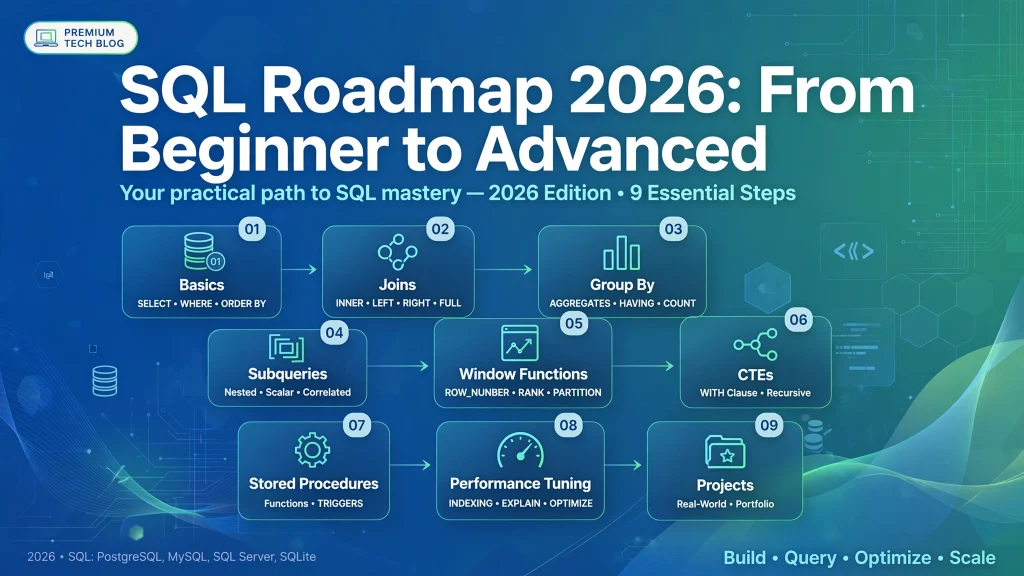
Meta Title: SQL Roadmap 2026: From Beginner to Advanced | Complete Guide
Meta Description: Follow this complete SQL Roadmap 2026 to learn SQL from beginner to advanced level. Explore SQL fundamentals, queries, joins, subqueries, database design, advanced SQL, projects, tools, career paths, and interview preparation.
SQL continues to be one of the most valuable technical skills for anyone working with data, software development, databases, business intelligence, analytics, or backend systems.
In 2026, organizations generate enormous amounts of structured and semi-structured data every day. Businesses need professionals who can retrieve information, analyze datasets, create reports, optimize database queries, and build applications that interact efficiently with databases.
That is why learning SQL in 2026 remains a practical career investment.
But many beginners face the same problem: they do not know what to learn first.
Should you start with SELECT statements?
Should you learn database design before joins?
When should you learn subqueries?
Are window functions necessary?
How much SQL is required for a data analyst?
What should developers learn after SQL basics?
This SQL Roadmap 2026 answers these questions by providing a structured path from absolute beginner to advanced SQL professional.
You do not need to learn every SQL feature at once. The best approach is to build your knowledge progressively:
SQL Fundamentals → Basic Queries → Filtering & Sorting → Aggregations → Joins → Subqueries → Data Modification → Database Design → Advanced SQL → Query Optimization → Projects → Interview Preparation
Let’s explore each stage in detail.
SQL, or Structured Query Language, is a programming language used to communicate with relational database management systems.
SQL allows you to:
Popular relational database systems include:
Although these systems have their own SQL extensions and features, the fundamental SQL concepts are highly transferable.
SQL is not limited to database administrators.
Today, SQL is useful for:
One major advantage of SQL is its accessibility.
You can begin writing useful queries without learning complex programming concepts first.
For example:
SELECT name, salary
FROM employees
WHERE salary > 50000;
This simple query retrieves employees whose salary is greater than 50,000.
As your skills improve, SQL can become extremely powerful.
Here is the recommended SQL learning path for 2026:
Learn:
Learn:
Learn:
Learn:
Learn:
Learn:
Learn:
Learn:
Learn:
Build:
Before writing advanced SQL queries, understand how databases work.
A database is an organized collection of information.
A relational database stores information in tables.
For example, an employee table might contain:
| Employee_ID | Name | Department | Salary |
|---|---|---|---|
| 101 | Rahul | IT | 65000 |
| 102 | Priya | HR | 55000 |
| 103 | Arjun | Finance | 70000 |
Each row represents a record.
Each column represents an attribute.
Start by understanding:
These concepts form the foundation of your SQL learning journey.
Once you understand databases, begin learning basic SQL syntax.
The first statement you should learn is SELECT.
SELECT *
FROM employees;
This retrieves all columns from the employees table.
You can select specific columns:
SELECT name, department
FROM employees;
Learning to retrieve data is the first major milestone in your SQL roadmap for beginners.
The SELECT statement is arguably the most frequently used SQL command.
Practice:
SELECT name
FROM employees;
Multiple columns:
SELECT name, salary, department
FROM employees;
All columns:
SELECT *
FROM employees;
Distinct values:
SELECT DISTINCT department
FROM employees;
Your goal at this stage should be to become comfortable reading and writing basic queries.
The WHERE clause allows you to filter records.
SELECT *
FROM employees
WHERE department = 'IT';
You can use comparison operators:
Example:
SELECT *
FROM employees
WHERE salary > 60000;
Multiple conditions:
SELECT *
FROM employees
WHERE department = 'IT'
AND salary > 60000;
Using OR:
SELECT *
FROM employees
WHERE department = 'IT'
OR department = 'Finance';
The ORDER BY clause sorts results.
Ascending order:
SELECT *
FROM employees
ORDER BY salary ASC;
Descending order:
SELECT *
FROM employees
ORDER BY salary DESC;
You can also sort using multiple columns:
SELECT *
FROM employees
ORDER BY department ASC, salary DESC;
Sorting becomes especially useful in reporting and analytics.
If you want to retrieve only a certain number of records, use LIMIT in systems such as PostgreSQL and MySQL.
SELECT *
FROM employees
LIMIT 10;
You can combine it with sorting:
SELECT *
FROM employees
ORDER BY salary DESC
LIMIT 5;
This can be used to find the highest-paid employees.
SQL dialects differ, so also understand alternatives such as TOP in SQL Server and pagination approaches supported by different database systems.
One of the most important beginner SQL concepts is NULL.
NULL does not simply mean zero or an empty string.
It generally represents missing or unknown information.
Incorrect:
WHERE manager_id = NULL
Correct:
WHERE manager_id IS NULL
To find non-null values:
WHERE manager_id IS NOT NULL
Understanding NULL becomes extremely important when working with real-world datasets.
You should become comfortable with operators such as:
SELECT *
FROM employees
WHERE salary BETWEEN 50000 AND 80000;
SELECT *
FROM employees
WHERE department IN ('IT', 'HR', 'Finance');
SELECT *
FROM employees
WHERE name LIKE 'A%';
Here % represents zero or more characters in a LIKE pattern.
SELECT *
FROM employees
WHERE department NOT IN ('HR', 'Finance');
These operators are essential for practical SQL queries.
Once you understand basic filtering, learn aggregate functions.
The five core aggregate functions are:
Example:
SELECT COUNT(*)
FROM employees;
Average salary:
SELECT AVG(salary)
FROM employees;
Total salary:
SELECT SUM(salary)
FROM employees;
Highest salary:
SELECT MAX(salary)
FROM employees;
Lowest salary:
SELECT MIN(salary)
FROM employees;
These functions are particularly important for data analysts and business intelligence professionals.
GROUP BY allows you to organize records into groups before performing aggregate calculations.
For example:
SELECT department, COUNT(*)
FROM employees
GROUP BY department;
This calculates the number of employees in each department.
Average salary by department:
SELECT department, AVG(salary)
FROM employees
GROUP BY department;
Total salary by department:
SELECT department, SUM(salary)
FROM employees
GROUP BY department;
Understanding GROUP BY is a major milestone in your SQL learning path.
HAVING filters grouped results.
For example:
SELECT department, AVG(salary) AS average_salary
FROM employees
GROUP BY department
HAVING AVG(salary) > 60000;
A common beginner mistake is confusing WHERE and HAVING.
Filters individual rows before grouping.
Filters groups after aggregation.
Understanding this distinction will help you write more accurate SQL queries.
Joins are among the most important topics in the SQL roadmap 2026.
Real-world databases usually contain multiple related tables.
For example:
| employee_id | name | department_id |
|---|
| department_id | department_name |
|---|
You can combine these tables with a JOIN.
SELECT e.name, d.department_name
FROM employees e
JOIN departments d
ON e.department_id = d.department_id;
Returns matching records from both tables.
SELECT *
FROM employees e
INNER JOIN departments d
ON e.department_id = d.department_id;
Returns all records from the left table and matching records from the right table.
SELECT *
FROM employees e
LEFT JOIN departments d
ON e.department_id = d.department_id;
Returns all records from the right table and matching records from the left table.
Returns matching and non-matching records from both sides where supported by the database system.
Produces combinations between rows of two tables.
Joins a table to itself.
Self joins are useful for hierarchical relationships such as employee-manager structures.
A subquery is a query inside another SQL query.
Example:
SELECT name, salary
FROM employees
WHERE salary > (
    SELECT AVG(salary)
    FROM employees
);
This retrieves employees earning above the average salary.
You should learn:
Subqueries are important, but you should not rely on them for every problem. In many cases, joins or CTEs can make the logic clearer.
The CASE expression allows you to implement conditional logic.
SELECT name,
       salary,
       CASE
           WHEN salary >= 80000 THEN 'High'
           WHEN salary >= 50000 THEN 'Medium'
           ELSE 'Low'
       END AS salary_category
FROM employees;
CASE expressions are heavily used in:
String manipulation is extremely useful when working with business data.
Important functions vary by database, but commonly include:
Example:
SELECT UPPER(name)
FROM employees;
You can use string functions to clean and transform data.
Dates are everywhere in business databases.
You should understand:
Example concepts include:
SELECT EXTRACT(YEAR FROM order_date)
FROM orders;
Exact syntax varies across database platforms.
Practice analyzing:
SQL isn’t only about reading data.
You also need to understand data modification.
INSERT INTO employees
(name, department, salary)
VALUES
('Amit', 'IT', 65000);
UPDATE employees
SET salary = 70000
WHERE employee_id = 101;
DELETE FROM employees
WHERE employee_id = 101;
Always understand the importance of the WHERE clause before executing UPDATE or DELETE statements.
An incorrect query can modify many more rows than intended.
These commands are part of SQL’s Data Definition Language.
Create a table:
CREATE TABLE employees (
    employee_id INT,
    name VARCHAR(100),
    salary DECIMAL(10,2)
);
You should also learn:
The exact supported syntax depends on the database system you are using.
Constraints help maintain data integrity.
Important constraints include:
Example:
CREATE TABLE employees (
    employee_id INT PRIMARY KEY,
    name VARCHAR(100) NOT NULL,
    salary DECIMAL(10,2) CHECK (salary >= 0)
);
Understanding constraints helps you understand how reliable databases are designed.
A primary key uniquely identifies a record.
For example:
employee_id
could uniquely identify an employee.
A foreign key establishes a relationship between tables.
For example:
employees.department_id
could reference:
departments.department_id
This relationship is fundamental to relational database design.
As you move from beginner to intermediate SQL, learn normalization.
Normalization helps organize data and reduce unnecessary duplication.
Important concepts include:
You do not necessarily need to become a database architect to use SQL professionally, but understanding normalization will help you design better databases.
Set operations allow you to combine results from multiple queries.
Learn:
Example:
SELECT city
FROM customers

UNION

SELECT city
FROM suppliers;
UNION generally removes duplicate rows, while UNION ALL retains them.
Understanding the difference is important for both correctness and performance.
Common Table Expressions, commonly called CTEs, make complex SQL queries easier to organize.
Example:
WITH department_salary AS (
    SELECT department,
           AVG(salary) AS avg_salary
    FROM employees
    GROUP BY department
)
SELECT *
FROM department_salary
WHERE avg_salary > 60000;
CTEs are especially useful when queries contain multiple logical steps.
Learn both:
Recursive CTEs are useful for hierarchical data such as organizational structures and category trees.
Window functions are one of the most important advanced SQL topics.
Unlike regular aggregate functions, window functions can calculate values across related rows while preserving individual records.
Important functions include:
Example:
SELECT
    employee_id,
    name,
    department,
    salary,
    RANK() OVER (
        PARTITION BY department
        ORDER BY salary DESC
    ) AS salary_rank
FROM employees;
This ranks employees within each department.
Window functions are especially valuable for:
A view is a database object that represents a query result.
Example:
CREATE VIEW high_salary_employees AS
SELECT name, department, salary
FROM employees
WHERE salary > 80000;
Views can help simplify repeated queries and control access to selected data.
Learn:
Indexes can dramatically improve query performance when used appropriately.
An index provides a data structure that can help the database locate rows efficiently.
Example:
CREATE INDEX idx_employee_department
ON employees(department);
However, indexes are not automatically beneficial for every column.
Indexes can:
Therefore, advanced SQL learning should include understanding when an index helps and when it does not.
Transactions are essential when multiple database operations must be handled as a logical unit.
Important concepts include:
ACID refers to:
A transaction should be treated as a unit.
Data should remain valid according to database rules.
Concurrent transactions should behave according to the database’s isolation guarantees.
Committed changes should survive appropriate system failures.
Transactions are particularly important in financial systems, e-commerce applications, and other systems where data consistency matters.
As you become advanced, learn transaction isolation.
Common isolation levels include:
Some database systems also provide additional mechanisms or variations.
Learn how isolation levels affect phenomena such as:
This topic is particularly useful for backend developers and database professionals.
If you want to become an advanced SQL developer, don’t stop at writing queries.
Learn how databases execute them.
Study:
Most major database platforms provide commands or tools for examining execution plans.
Understanding execution plans can transform you from someone who simply writes SQL into someone who can diagnose performance problems.
Query optimization is an advanced SQL skill.
Consider these practices:
Do not blindly optimize every query.
First identify the actual bottleneck, then make a measurable improvement.
Stored procedures are reusable routines stored in a database.
They can contain:
Their syntax varies significantly between database platforms.
Learn stored procedures if your target job requires database-side business logic.
Triggers automatically execute in response to certain database events.
For example, a trigger might execute after an INSERT or UPDATE.
Triggers can be useful, but they should be designed carefully because hidden database-side behavior can make applications harder to understand and maintain.
Study:
Exact support differs between database products.
You don’t need to learn every database simultaneously.
For most beginners, choose one database and become comfortable with it.
Good choices include:
A powerful open-source relational database with extensive SQL capabilities.
A popular database commonly used in web development and many application environments.
Widely used in enterprise environments and closely associated with the Microsoft ecosystem.
A major enterprise database platform with extensive functionality.
A lightweight database often used for local applications, embedded systems, prototypes, and learning.
The fundamentals of SQL transfer across systems, but syntax and advanced capabilities can differ.
Reading SQL tutorials is not enough.
You need hands-on practice.
A practical routine could be:
30 minutes learning + 60 minutes solving SQL problems
Start with:
Then move toward real datasets.
Projects are one of the best ways to prove that you understand SQL.
Create tables for:
Practice:
Create:
Analyze:
Create:
Practice transaction-related concepts and analytical queries.
Create:
Analyze appointment patterns and operational metrics.
Build a database containing:
Answer questions such as:
If your goal is to become a Data Analyst, prioritize these SQL topics:
You should also combine SQL with:
For many analyst roles, advanced database administration topics are less important than strong analytical SQL skills.
Developers should focus on:
You should also understand how application code communicates with databases.
Data engineers should go deeper into:
SQL is often a core skill in modern data engineering workflows.
Data scientists should focus on:
SQL combined with Python and statistics provides a strong foundation for data science.
If you have never programmed before, don’t worry.
You can still learn SQL.
Start with:
Week 1: Database fundamentals and SELECT
Week 2: WHERE, ORDER BY, LIMIT, operators
Week 3: Functions and aggregation
Week 4: GROUP BY and HAVING
Week 5: JOINs
Week 6: Subqueries and CASE
Week 7: CTEs and set operations
Week 8: Window functions
Week 9: Database design and constraints
Week 10: Indexes and transactions
Week 11: SQL project
Week 12: Interview preparation
The exact timeline is flexible. Consistent practice matters more than finishing a roadmap quickly.
Once you understand SQL fundamentals, begin solving interview questions.
There are several valid approaches, including ranking functions and subqueries.
Use grouping and aggregation to identify repeated values.
Use an aggregate subquery or a suitable window-function approach.
Use window functions such as ROW_NUMBER() or DENSE_RANK() depending on the desired handling of ties.
Windowed SUM() is commonly used.
LAG() is particularly useful for this problem.
Combine aggregation, window functions, or appropriate ranking techniques.
These problems appear frequently in SQL interview preparation and data analytics exercises.
You can practice SQL using different environments.
Popular choices include:
Choose one primary database while learning fundamentals rather than constantly switching between platforms.
By the end of your learning journey, you should be comfortable with:
SQL is best learned through repeated problem-solving.
Master one database first.
JOINs are essential for real-world relational data.
Once you understand the basics, learn CTEs and window functions.
Always inspect table relationships and column meanings first.
A query that works on 1,000 rows may perform poorly on millions of rows.
Projects turn theoretical knowledge into practical experience.
The answer depends on your background and goals.
You may become comfortable with basic queries within a few weeks of consistent practice.
Expect additional time to master joins, aggregations, subqueries, CTEs, and real-world datasets.
Window functions, query optimization, transactions, execution plans, and database architecture require significantly more practice.
The important goal is not to finish SQL as quickly as possible.
The goal is to become capable of solving real problems independently.
Yes.
SQL remains relevant because relational databases continue to power applications, enterprise systems, analytics platforms, reporting systems, and many data workflows.
Even as AI tools become more capable, professionals still need to understand:
AI may help people write SQL faster, but SQL knowledge remains valuable for verifying and reasoning about the results.
AI is changing how people interact with databases.
Natural-language-to-SQL systems can convert questions into SQL queries.
For example, a user might ask:
“Show me monthly revenue for the last two years.”
An AI system may generate a SQL query.
However, a professional still needs to determine:
Therefore, learning SQL remains useful even in an AI-assisted development environment.
SQL can support careers such as:
SQL is rarely the only skill required for these jobs, but it is frequently an important part of the technical foundation.
A practical strategy is:
Learn the concepts.
Write queries every day.
Work through increasingly difficult SQL problems.
Create real-world database projects.
Learn execution plans and performance.
Choose data analytics, development, engineering, database administration, or another career direction.
Practice SQL interview questions and scenario-based problems.
Study:
Practice at least several queries each day.
Learn:
Build a small sales-analysis database.
Master:
Practice multi-table problems.
Learn:
Start solving interview-style questions.
Study:
Focus on:
By the end of this period, you should have a much stronger foundation for practical SQL work.
Don’t only copy solutions.
Use this process:
Step 1: Read the problem.
Step 2: Understand the expected output.
Step 3: Identify relevant tables.
Step 4: Identify relationships.
Step 5: Decide whether you need filtering, grouping, joining, or ranking.
Step 6: Write the query.
Step 7: Test it.
Step 8: Check edge cases.
Step 9: Compare your result with the expected output.
Step 10: Look for a simpler or more efficient solution.
This approach develops actual SQL problem-solving ability.
If you want a simple roadmap to remember, use this sequence:
Database Fundamentals
↓
SQL Syntax
↓
SELECT & WHERE
↓
Filtering & Sorting
↓
Functions
↓
GROUP BY & HAVING
↓
JOINs
↓
Subqueries
↓
CASE Expressions
↓
Set Operations
↓
CTEs
↓
Views
↓
Database Design
↓
Indexes
↓
Transactions
↓
Window Functions
↓
Execution Plans
↓
Query Optimization
↓
Real-World Projects
↓
Interview Preparation
↓
Career Specialization
SQL is generally approachable for beginners because you can start with relatively simple statements. The difficulty increases when you work with complex joins, nested queries, window functions, optimization, and large databases.
Yes. SQL can be learned without prior programming experience. Understanding basic logic and data concepts will help as you progress.
Even 30–60 minutes of focused practice can be useful. Consistency is generally more important than studying for long periods occasionally.
Either can be a good starting point. Choose one database and learn SQL fundamentals thoroughly before exploring other platforms.
SQL is an important skill for many data analyst positions, but employers may also expect knowledge of spreadsheets, visualization, statistics, business analysis, and sometimes Python.
For data analytics, SQL is often an excellent first technical skill because it teaches you how to retrieve and manipulate structured data. You can then add Python for deeper analysis and automation.
Joins can initially be confusing because they require understanding relationships between tables. With practice using small datasets and diagrams, they become much easier.
You don’t need window functions to learn basic SQL, but they are extremely valuable for advanced analytics and many professional SQL tasks.
Yes. AI can assist with query generation, but professionals still need SQL knowledge to validate queries, understand data relationships, troubleshoot errors, and evaluate results.
Start with practical projects such as an employee database, e-commerce database, sales analytics system, inventory database, or customer analytics project.
Learning SQL in 2026 is less about memorizing hundreds of commands and more about learning how to think about data.
Start with the fundamentals.
Master SELECT, filtering, sorting, aggregation, and grouping.
Then learn joins and subqueries.
After that, move into CTEs, views, database design, window functions, transactions, indexes, execution plans, and optimization.
Most importantly, practice SQL with real problems.
A person who understands why a query works is far more valuable than someone who has simply memorized SQL syntax.
If your ultimate goal is a career in data analytics, data engineering, software development, backend development, business intelligence, or database management, SQL can become one of the most useful skills in your technical toolkit.
The ideal SQL learning journey is therefore:
Learn → Practice → Solve → Build → Optimize → Specialize → Interview
Start with one database, one dataset, and one SQL query today. Build your skills consistently, and you can progress from a complete beginner to an advanced SQL practitioner.
Get a free consultation and today’s voucher price on WhatsApp.